Where AI document processing helps, and where it bites
AI document processing — sometimes called intelligent document processing — uses AI to read documents and turn them into structured data: extracting line items from invoices, key terms from contracts, fields from forms, totals from receipts. Done well, it removes one of the most tedious jobs in any operation and frees people for work that needs judgement.
The trouble is that the demo always looks perfect. A clean PDF goes in, tidy fields come out, and it feels solved. Real document flows are messier: scanned pages, unusual layouts, handwriting, multiple languages, and edge cases your sample never showed. The expensive and risky part is rarely the extraction itself — it is everything around it, the validation, the exceptions, and what happens when the AI is wrong but sounds right.
So the honest framing is not "is AI good at reading documents" (it often is) but "what happens on the day it reads one wrong, or reads one it never should have seen". The rest of this guide is about answering that before it happens.
The five risks that actually cause problems
Many practical failures in AI document processing fall into five categories. They are not exotic. They are recurring risks that show up whenever teams automate documents without a control plan.
- Silent extraction errors. The AI returns a value that looks right and is wrong — a transposed total, a misread date, the wrong party named in a clause. Fluency is not accuracy: a confident, well-formatted answer can still be incorrect. Because the output looks clean, no one questions it, and the error flows straight into a payment, a record, or a decision.
- Documents leaving your control. When a document is sent to an external AI service, its contents leave your environment. If staff use personal or consumer AI accounts to "just get it done", you lose visibility over where customer data went, whether it was retained, and whether it was used to improve someone else's model. This unsanctioned use can happen precisely because it is convenient.
- No confidence signal. If a tool cannot tell you how sure it is about each field, you cannot tell which outputs are safe and which need a second look. Without a confidence signal you are left with two bad options: trust everything (and inherit every silent error) or check everything (and lose the time you were trying to save).
- Accuracy and privacy obligations. When documents contain personal or regulated information, getting a field wrong is not just an operational annoyance — many privacy regimes require organisations to take reasonable steps to keep personal data accurate, and acting on fabricated or misattributed data can create a compliance exposure. The obligation does not disappear because an AI produced the error.
- Hidden cost and over-reliance. The per-page cost of extraction is usually the small part. Preprocessing, validation rules, exception handling, and the integration that moves results into your real systems are where the effort goes. Teams that assume the problem is fully solved tend to under-build the checks and over-trust the output, which is where avoidable failures begin.
Tier your documents before you automate
The most useful decision you can make is to stop treating all documents the same. A menu PDF and a signed loan agreement carry completely different risk, and they should not get the same level of automation or trust.
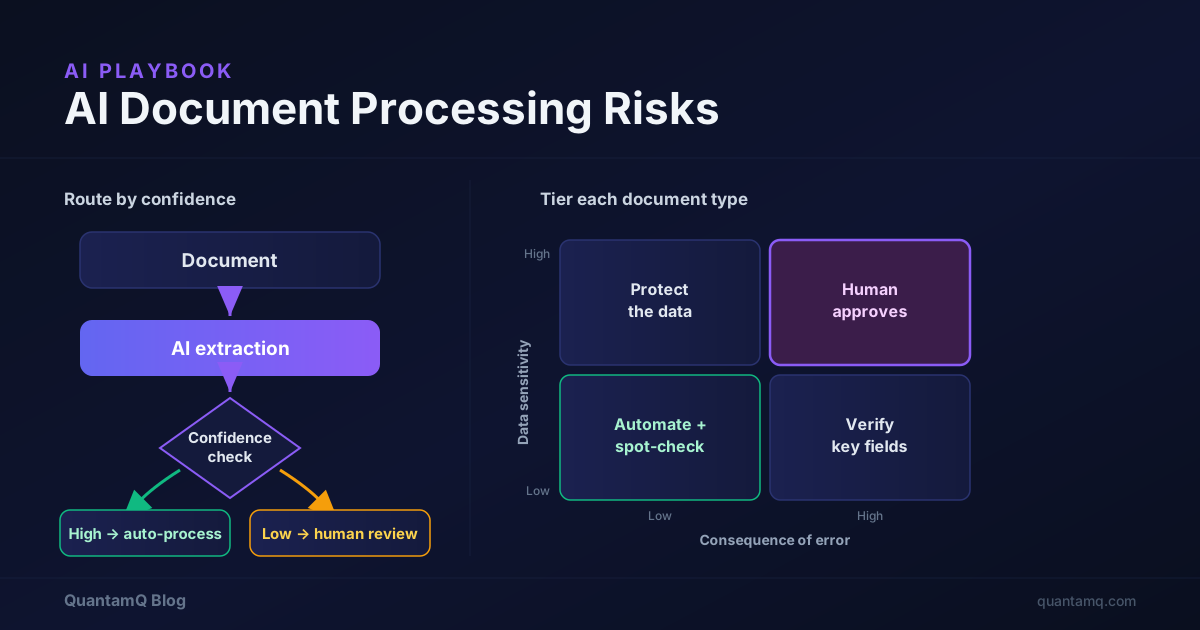
Tier each document type along two axes. Data sensitivity is how private or regulated the contents are: public marketing material is low; customer financial records, health information, contracts, and identity documents are high. Consequence of error is what happens if a field is wrong and no one catches it: a misread internal note is low; a wrong amount that triggers a payment, or a wrong term in a contract, is high.
Plot those two together and you get a simple guide for how much to automate and how much to check.
- Low sensitivity, low consequence (e.g. internal notes, non-critical forms): safe to automate with light, spot-check review. This is where AI document processing pays off fastest.
- Low sensitivity, high consequence (e.g. supplier invoices that drive payments): automate the extraction, but verify the fields that matter before acting — totals, account numbers, dates.
- High sensitivity, low consequence (e.g. internal documents with personal data): the privacy controls matter more than the accuracy check — make sure the documents are processed in an environment you trust.
- High sensitivity, high consequence (e.g. contracts, identity, regulated records): treat AI as a drafting aid, not a decision-maker. A person reviews and approves, and you are deliberate about where the data is processed.
Keep a human in the loop where it counts
"Human in the loop" does not mean a person re-checks everything — that would erase the benefit. It means you route outputs by confidence and risk, so people spend attention where an error would actually hurt.
The mechanism is a confidence threshold. A good document processing setup reports how sure it is about each extracted field. You set a line: above it, the result flows through automatically; below it, or for any high-consequence document type, it goes to a person to confirm before it is used.
- High confidence, low-risk tier: process automatically, and sample a small percentage to keep an eye on quality.
- Low confidence, or any high-consequence tier: queue for human review and approval before the data is used.
- Repeated low-confidence patterns: treat as a signal that a document type, layout, or supplier needs a rule, a template, or exclusion from automation.
Questions to ask before you send documents to any AI tool
Before a single sensitive document goes into a tool — whether it is an off-the-shelf product or something built for you — get clear answers to these. Vague answers are themselves a flag.
- Where is the data processed and stored, and in which country? This affects both your privacy obligations and who can compel access to it.
- Is our data used to train the provider's models? For sensitive documents, you usually want this switched off, in writing.
- How long is data retained, and can we delete it? "Indefinitely" is not an answer you want for customer documents.
- Does the tool report per-field confidence? Without it, you cannot run the human-in-the-loop pattern above.
- Who can access the documents and the extracted data internally? Access should be limited to people who need it, not open to the whole team.
- What happens to documents the AI cannot read? There should be a defined exception path, not a silent drop.
A safe way to roll it out
You reduce risk most by not deploying everything at once. Start narrow, prove it, then widen.
Pick one low-risk document type first — something in the low-sensitivity, low-or-medium-consequence tier with enough volume to be worth automating, and resist starting with contracts. Measure accuracy against a known sample: run a batch you have already verified by hand and compare, so you get a real error rate rather than a vibe. That number sets your confidence threshold and tells you if the tool is good enough at all.
Then set the review threshold and the exception path: decide what confidence level flows through automatically, what goes to a human, and what happens to documents the AI cannot handle. Run it in parallel before you rely on it — let the AI process alongside the existing manual process for a short period and compare outputs, because it is cheaper to catch problems here than after you have switched the old process off. Widen one tier at a time, adding a more sensitive or higher-consequence document type only once the current one is performing and the review queue is manageable.
Done this way, AI document processing stops being a leap of faith and becomes a controlled change you can defend. The same care applies after launch: extraction quality drifts as document formats and suppliers change, so keep sampling outputs and revisit your thresholds rather than assuming today's accuracy is permanent.
Frequently asked questions
What are the main risks of AI document processing?
The practical risks to control are silent extraction errors (confident but wrong data), documents and their contents leaving your control through third-party tools, no per-field confidence signal so you cannot tell which outputs to trust, accuracy and privacy obligations when the documents contain personal or regulated data, and the hidden cost and over-reliance that come from treating extraction as fully solved.
Is AI accurate enough to process documents without a human checking?
For low-stakes, low-sensitivity documents, often yes. For anything that drives a payment, a legal position, or a customer record, no — not without a check. AI extraction is fluent and fast but can be confidently wrong, so the safe pattern is to route low-confidence and high-consequence outputs to a human rather than trusting everything equally.
Is it safe to use AI to process documents with personal or sensitive data?
Only if you know where the documents go and what happens to them. Using consumer AI tools for sensitive customer documents means losing visibility over data flows. Before processing sensitive documents, confirm where data is stored, whether it is used to train models, how long it is retained, and that the arrangement meets your privacy obligations.
How do I reduce the risk of AI document processing errors?
Tier your documents by sensitivity and consequence of error, use a tool that reports field-level confidence, set a threshold below which a human reviews the output, start with one low-risk document type, measure accuracy against a known sample, and only widen the scope once the error rate is acceptable.
What is human-in-the-loop document processing?
It means the AI extracts the data but a person reviews and approves outputs that are uncertain or high-consequence before they are used. Rather than checking everything or nothing, you route work by confidence and risk, so people spend their attention where an error would actually hurt.