Security is your job, even if you don't write code
You are about to launch a web app. You may not have written a line of the code, but the moment real customers and their data are in it, security is your responsibility. If something goes wrong, "the developers handled it" is not an answer your customers, or a regulator, will accept.
The good news is that you do not need to become a security engineer. You need to know which risks actually cause incidents, what to check before you launch, and what questions to put to the people building your app. This is a web app security checklist written for founders and operators, not for penetration testers — a way to verify the basics are in place and to have a sharper conversation with your developers before you go live.
Many early-stage security failures are not the result of a sophisticated attacker defeating clever defences. They happen because no one was clearly responsible for the basics, so the basics were skipped. A page that forgot to check who is logged in. A default admin password that was never changed. A dependency with a known hole that was never updated. None of these requires advanced expertise to exploit, and all of them are preventable.
As the founder, you own the decision about whether the basics are done before launch — not because you implement them, but because you set the priority. If speed is the only thing you reward, security quietly loses every time it competes with a feature. The fix is to make a small number of security checks an explicit, non-optional part of being ready to launch, the same way you would not ship without the product actually working.
What actually causes incidents
The security community maintains a well-known reference for this: the OWASP Top 10, a periodically updated list of the most critical web application security risks. The current 2025 edition is built on a large dataset of real-world vulnerabilities, and the pattern it shows is useful for a founder deciding where to spend limited attention.
Two things sit at the very top. Broken access control — where a user can reach data or actions they should not be able to — remains the number one risk. Security misconfiguration — default settings, exposed admin panels, verbose error messages, overly open permissions — has risen to number two. The expanded software supply chain failures category reflects how much modern apps depend on third-party packages that can themselves be compromised or outdated.
The practical takeaway is that the highest-value risks to tackle first are often mundane and fixable. They are about discipline, not wizardry: checking permissions on every request, not leaving things in their insecure default state, keeping your dependencies current and trusted, handling authentication properly, protecting data and secrets, and noticing when something goes wrong. That is what the checklist below covers. You are not trying to be unbreakable; you are trying not to leave the obvious doors open.
The pre-launch security checklist
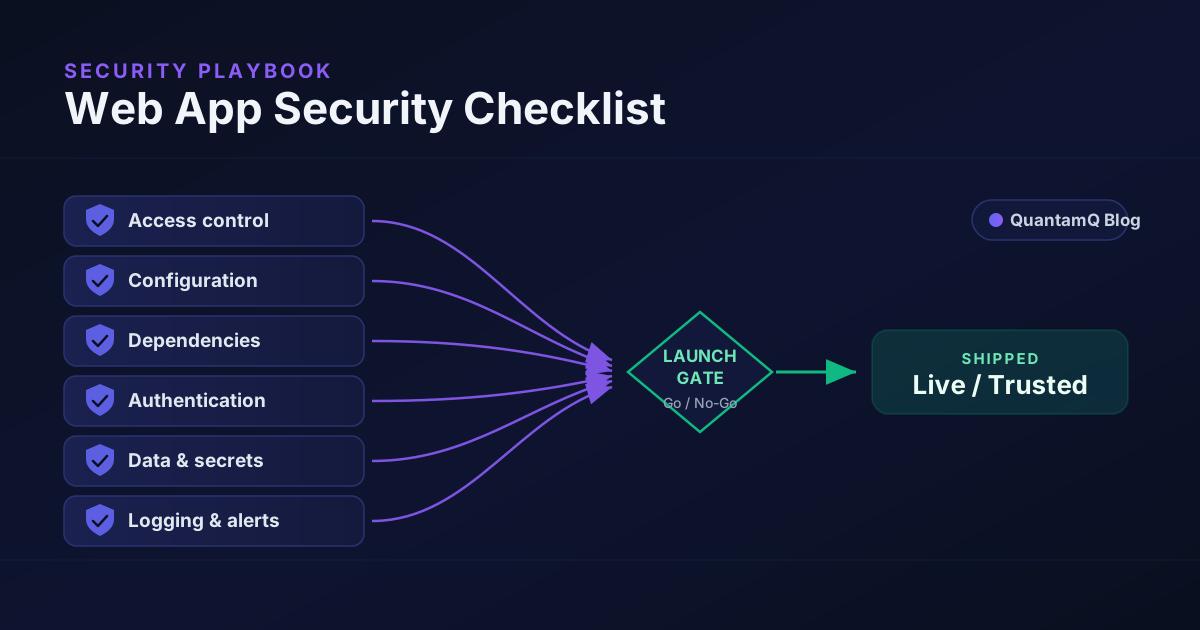
Work through these six areas before launch. Each one maps to a category that causes real incidents, written as something you can verify or ask about rather than implement yourself.
- Access control — checked on every request. Confirm the app verifies who is logged in and what they are allowed to do on every page and action, on the server, not just by hiding buttons. Test it: log in as a normal user and try to reach an admin page or another user's record directly. You should be refused.
- Configuration — hardened, not default. Make sure HTTPS is enforced everywhere, default and sample credentials are removed, admin interfaces are not openly reachable, and error pages do not leak stack traces or internal details. Framework defaults are a starting point, not a secure end state.
- Dependencies — current and vetted. Your app is built on third-party libraries. Confirm there is a way to see which dependencies have known vulnerabilities and a routine for updating them. A one-off check at launch is not enough; new holes are found in old packages constantly.
- Authentication — done properly. Passwords must be stored hashed, never in plain text. Offer or require multi-factor authentication for sensitive accounts, especially admin access. Protect against unlimited login attempts, and make password reset flows secure rather than a side door.
- Data and secrets — protected and out of the code. Sensitive data should be encrypted in transit and, where appropriate, at rest. API keys, database passwords, and tokens must live in secure configuration, never hard-coded in the source or committed to your repository. A leaked secret in a public repo is one of the most common and most damaging mistakes.
- Logging and alerting — someone finds out. If something suspicious happens, can you tell? Confirm the app records security-relevant events and that a real person or system is alerted to the important ones. A breach you discover months later is far worse than one you catch the same day.
Questions to ask your developers
You can verify a lot without reading code by asking direct questions and listening for whether the answer is specific or vague. Vague is a flag.
- "How does the app check that a logged-in user is allowed to do each thing they request?"
- "Where are our secrets and API keys stored, and can you show me they are not in the repository?"
- "How do we know if one of our dependencies has a known vulnerability, and how do we update it?"
- "What happens after five failed login attempts on the same account?"
- "If someone tried to access another customer's data, would we see it in a log, and would anyone be alerted?"
- "What did we change from the framework's default configuration before going live?"
Non-negotiable for launch vs later
Not everything has to be perfect on day one, but some things genuinely cannot wait. Treat the launch like a gate: these must be true before real customer data goes in.
Non-negotiable before launch: HTTPS enforced everywhere with no mixed or insecure connections; access control checked server-side on every sensitive request; no default or shared credentials and no secrets committed to the codebase; passwords hashed with multi-factor authentication available for admin accounts; and a known-good list of dependencies with no unpatched critical vulnerabilities.
Important, but can follow shortly after: full security logging with alerting on suspicious activity; a web application firewall in front of the app; a formal dependency-update and patching cadence; an independent security review or penetration test; and a documented incident response plan for when something does go wrong.
The split is about consequence. The first list contains the things that, if missing, let a stranger walk in. The second list makes you faster to detect and respond, which matters enormously but does not leave the front door open on launch day. Be honest about which list each task is on, and do not let a "later" item quietly become a "never" one.
Keep it going after launch
Security is not a task you complete; it is a state you maintain. Dependencies that were current at launch will have known vulnerabilities within months. New features add new places for access control to slip. The most valuable ongoing habit is a small, regular review — patch dependencies on a schedule, re-check access control whenever you add a feature that touches sensitive data, and rotate secrets if anyone with access leaves.
Decisions you make around the app matter too. Where you host the app affects your default protections, the firewall options available to you, and how easily you can lock things down — worth weighing alongside cost and performance when you choose your hosting platform. Backups deserve the same discipline: test that you can actually restore from them, because an untested backup is a hope, not a safety net.
None of this requires a large security budget. It requires owning the responsibility, knowing the handful of things that matter most, and refusing to launch until the non-negotiables are true. If you would value a second set of eyes on your app's security before you go live, that review is exactly the kind of pre-launch work we do as part of building and shipping software people can trust.
Frequently asked questions
What should be on a web app security checklist?
The items that prevent common incidents: enforced access control on every request, a hardened configuration with no default credentials, up-to-date and vetted dependencies, sound authentication, encrypted data with secrets kept out of the code, and logging that actually alerts someone. Many avoidable breaches trace back to one of these, not to an exotic attack.
Do early-stage startups really need web app security?
Yes. The cost of getting the basics right before launch is small, and the cost of a breach — lost customer data, downtime, and lost trust — is not. You do not need an enterprise security programme on day one, but you do need the non-negotiables in place before real customer data goes in.
What is the OWASP Top 10 and should founders care?
The OWASP Top 10 is a widely used list of the most critical web application security risks, refreshed periodically by the security community. Founders do not need to memorise it, but it is the reference your developers should be building against, and broken access control and security misconfiguration sit at the top of the current list.
How much should a small team spend on web app security?
Most of the high-value work is process and discipline rather than expensive tooling: enforcing access control, patching dependencies, managing secrets, and turning on logging. Paid tools like a web application firewall or a security review add value, but the non-negotiable basics cost time and attention more than money.