The real question for a business site
You need to put a business website online and two names keep coming up: Cloudflare Pages and Vercel. Both are fast, both deploy straight from a Git repository, and both have a free tier. Most comparison articles then spend a thousand words arguing about edge performance and cold starts. For a small business website that is rarely the deciding factor.
A small business website has modest technical needs and a low tolerance for surprise costs. You want a fast, reliable, professional site with a custom domain and HTTPS, deployed automatically when you push a change, at a price you can predict. Raw benchmark numbers matter far less than they do for a high-traffic application.
Both platforms clear the technical bar easily. Both deploy from GitHub or GitLab, build your site automatically, serve it from a global network, and handle SSL certificates for you. So the comparison that actually helps you is not "which is faster" but "which fits how a business runs": the licensing rules, the cost curve, and the lock-in you take on. That is where the two genuinely differ.
The free-tier trap: commercial use
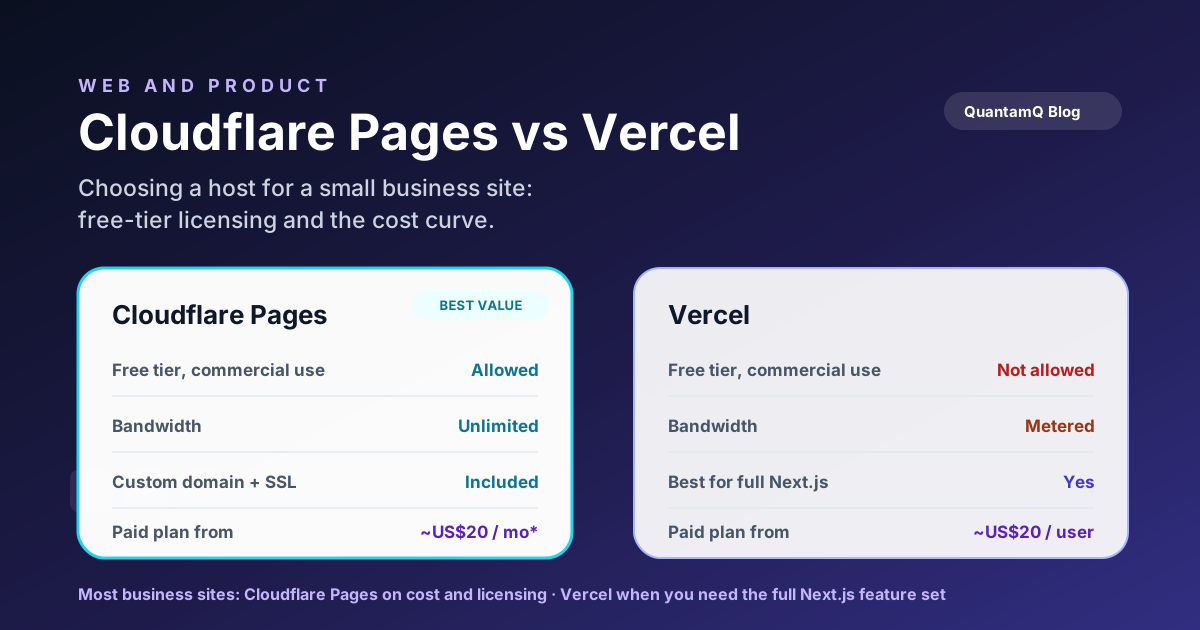
This is the single most important difference, and it is the one most comparisons skip. Vercel's free Hobby plan is restricted to non-commercial, personal use only. Vercel defines commercial usage broadly: any deployment used for someone's financial gain — taking or requesting payment, running advertising, or even being built by a paid developer or consultant for a business — counts as commercial and requires a paid plan.
In plain terms: you generally cannot run a real business website on Vercel’s free tier. The moment it is a commercial site, you are expected to be on Pro. That is not a hidden gotcha — it is in Vercel’s published fair-use terms — but it surprises a lot of people who assumed "free" meant free for their business.
Cloudflare Pages takes a different stance. Its free tier permits commercial use, and it is genuinely generous for a small site:
- Unlimited bandwidth on every tier, including free. Cloudflare does not bill overage or throttle a normal business site; if a project is unusually heavy it may ask you to upgrade, but ordinary traffic is not cut off.
- Custom domains with automatic SSL, with several custom domains per project on the free plan.
- Generous monthly build limits — far more than a typical small site needs.
What the bill looks like as you grow
Pricing changes often, so treat these as a snapshot at the time of writing in mid-2026 and confirm current rates on each provider's pricing page before you commit. The shape of the two cost curves is the durable insight, not the exact figures.
Cloudflare Pages keeps things simple. The free tier covers most small sites. Paid Pages plans currently start around US$20 per month when billed annually, or US$25 month-to-month, and raise build limits for teams that need more. Bandwidth stays unlimited across tiers, so a traffic spike — a campaign, a press mention, a viral post — does not produce a surprise bill.
Vercel's curve is more seat- and usage-sensitive. The Pro plan starts at around US$20 per user per month and includes a bandwidth allowance (about 1 TB at the time of writing). Go beyond the included transfer and you pay metered overage — currently starting around US$0.15 per GB.
The practical takeaway for a business: Cloudflare's model protects you from traffic-driven cost surprises, while Vercel's model is more predictable per user but exposes you to bandwidth overages if a page gets popular. Neither is wrong — but a small business watching cash flow usually prefers the version where a good traffic day cannot blow the budget.
Frameworks, features, and lock-in
The case for Vercel is strongest when your site is built with Next.js. Vercel makes Next.js, supports every feature first, and removes almost all configuration friction. If you are committed to Next.js and lean on its full feature set — the App Router, Server Actions, image optimisation, edge middleware — Vercel is the path of least resistance, and that smoothness is worth real money to some teams.
Cloudflare Pages is framework-flexible and pairs naturally with Cloudflare Workers for serverless logic at the edge. It can host Next.js through an adapter, but not every newer Next.js feature works perfectly there, so a heavily Next-specific app can hit rough edges. For most other stacks — a static site generator, a Vite or React build, a plain HTML/CSS/JS site, Astro, and similar — Cloudflare Pages is an excellent, low-cost home.
The lock-in to watch is not the static hosting; that part is portable on both. It is the platform-specific glue: serverless functions, edge middleware, framework adapters, and built-in integrations. The more of your logic lives in those, the harder a future move becomes. If keeping options open matters to you, keep that glue thin and standard. We build sites this way by default in our Websites and Web Apps work, so a hosting decision today never becomes a trap later.
A simple decision framework
You do not need to weigh a dozen variables. For a small business website, three questions settle it:
- Is it a commercial site and do you want a free tier? Choose Cloudflare Pages. It is the only one of the two that lets a business run on free hosting legitimately.
- Is it a Next.js app using the full Next feature set? Lean towards Vercel. The first-party support removes friction that an adapter cannot fully match.
- Is cost predictability under traffic spikes a priority? Choose Cloudflare Pages. Unlimited bandwidth means a popular day will not generate an overage bill.
What to check before you commit
Before you pick a host, run through a short checklist so the decision holds up six months from now:
- Confirm the current terms and pricing. Both providers change limits and plans; verify the free-tier commercial-use rules and bandwidth allowances directly on their sites.
- Estimate realistic traffic. If you expect occasional large spikes, weight unlimited bandwidth heavily. If traffic is steady and modest, either model is fine.
- List any dynamic features. Forms, payments, logins, or AI features may need serverless functions — check how each platform handles them and keep that logic portable.
- Decide who maintains it. A platform your team or partner already knows beats a marginally cheaper one nobody can operate confidently.
- Plan the exit. Make sure your code lives in a Git repository you own and platform-specific features are isolated, so switching later is a small job, not a rebuild.
Choosing the boring, durable option
For most small business sites, this exercise points to Cloudflare Pages on cost and licensing, with Vercel earning its place when a Next.js feature set or a specific workflow justifies the spend.
If you would rather not run the comparison yourself, a short conversation about your traffic, stack, and growth plans is usually enough to settle it. That is the kind of practical call we help with across our Custom Software and web work — choosing the boring, durable option so the site stays cheap to run and easy to change.
Frequently asked questions
Is Cloudflare Pages or Vercel cheaper for a small business website?
For most small business sites Cloudflare Pages is cheaper because the free tier can cover a normal commercial marketing site. Vercel's free Hobby tier is non-commercial only, so a business site needs the Pro plan, which starts at US$20 per user per month at the time of writing.
Can I run a commercial website on Vercel's free plan?
No. Vercel's Hobby plan is restricted to non-commercial, personal use. Any site used for financial gain — taking payments, running ads, or built by a paid developer for a business — needs a Pro or Enterprise plan. Always check Vercel's current fair-use terms before relying on the free tier for business.
Do I need Vercel to host a Next.js site?
No, but it is the smoothest path. Vercel builds Next.js and supports every feature first. Cloudflare Pages can host Next.js through an adapter, but some newer App Router features and Server Actions may not work perfectly. If you are committed to Next.js and use its full feature set, Vercel reduces friction.
Which is better for a simple marketing or brochure website?
For a static or lightly dynamic marketing site, Cloudflare Pages is usually the better value: free commercial hosting, custom domains with automatic SSL, unlimited bandwidth, and a large global network. Vercel is excellent too, but you are paying for capabilities a brochure site rarely needs.
How hard is it to move from one to the other later?
For a standard static or framework-built site, moving is straightforward — both deploy from a Git repository and serve built static files. The friction comes from platform-specific features like serverless functions, edge middleware, or framework adapters. Keep those portable and a future move stays low-risk.