Scope is the real risk, not code
You have an app idea, a budget, and a list of features that keeps growing. The hard part of a mobile MVP is not writing the code. It is deciding what not to build. Most first apps do not fail because the engineering was weak. They fail because the team spent the budget building accounts, settings, offline mode, push notifications, payments, and two native apps before they had any proof that the core idea worked.
This is a practical guide to scoping a mobile MVP without overbuilding. The aim is not to build a small product for its own sake. It is to build the smallest product that gives you a real answer to one question: do people actually want this, and will they use it the way you think? Get that answer cheaply, then spend the rest of the budget on what the evidence tells you to build.
When a mobile build runs over budget, the cause is almost never a single hard technical problem. It is dozens of small "while we are at it" decisions. Add a profile screen. Add password reset. Add a settings page. Add dark mode. Add an onboarding tutorial. Support tablets too. None of these is wrong, but together they turn a focused validation build into a much larger product build, and you still have not learned whether the core idea holds.
The discipline that protects an MVP is separating two questions teams tend to blur: what should we learn, and what should we build? Scope creep starts the moment you answer the second before the first. Decide what you need to learn, and most of the feature list answers itself. This is the same reasoning behind a proper software discovery phase — a small amount of deliberate thinking up front removes a large amount of expensive guessing later.
Start with one core loop
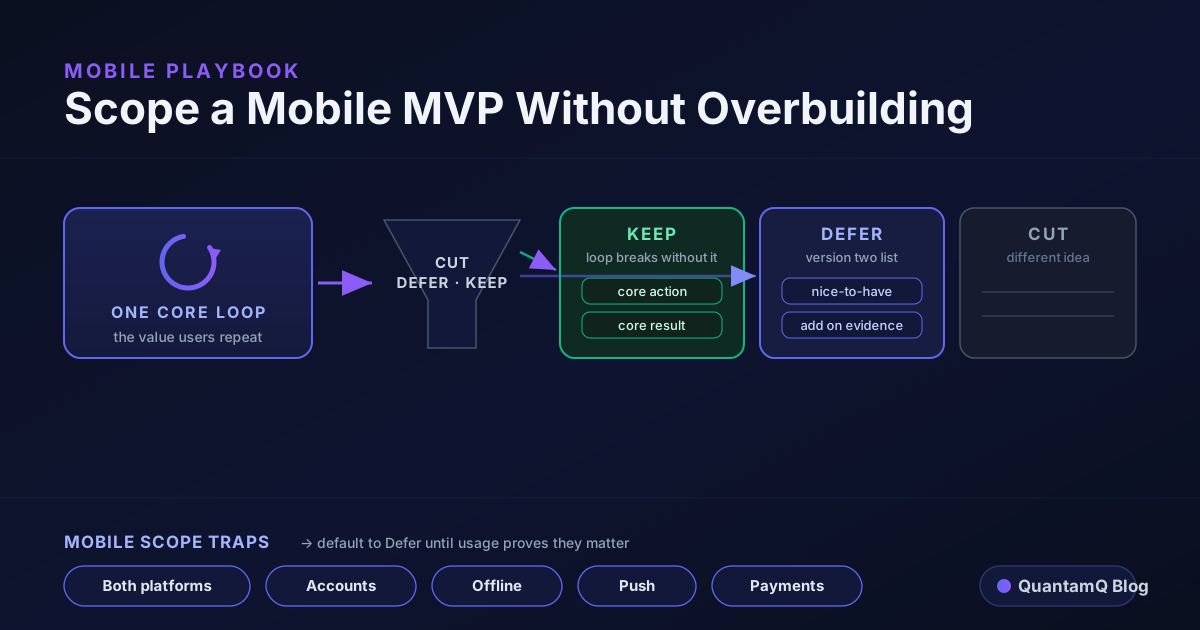
Before you list features, define the core loop. The core loop is the single sequence a user repeats to get the value your app promises. Everything in the MVP exists to make that loop possible. Everything that does not serve it can wait.
A core loop is usually one sentence. For a food-delivery app it is: open the app, find a meal, order it, get it. For a habit tracker it is: open the app, log today, see your streak. For a marketplace it is: list an item, get a message, agree a sale. Notice what is missing from those sentences — accounts, profiles, ratings, filters, notifications. Those are real features, but they are not the loop. They are things you bolt on once the loop has proven it is worth using.
Write your loop down in one line. Then ask of every feature on your list: does this make the loop possible, or does it make the loop nicer? An MVP needs the features that make the loop possible. The ones that make it nicer are exactly what you defer. This single distinction removes more scope than any framework.
If you cannot describe your app as one loop, that is a signal worth pausing on. It usually means you are trying to validate several ideas at once, and an MVP can only honestly test one at a time.
The cut-defer-keep test
Once you have the loop, sort every feature into one of three buckets. This is a simpler, decision-first version of the prioritisation methods you will see elsewhere, and for a first build it is enough.
- Keep — the feature is required to complete the core loop. Without it, a user cannot get the value, so it ships in v1.
- Defer — the feature improves the experience but the loop works without it. It goes on a real, written "version two" list, not into v1.
- Cut — the feature serves a different idea, a different audience, or a "what if they also want" hunch. It leaves the plan entirely until evidence brings it back.
The mobile-specific scope traps
Some features feel mandatory on mobile specifically, and they are where mobile MVPs quietly expand in cost and delivery risk. Each of these is usually a defer, not a keep, for a first build.
- Both platforms at once — two native apps mean two codebases to build, test, and submit, two review processes, and two sets of store rules. Unless your first users are genuinely split evenly across iOS and Android, this adds a lot of work before you have learned whether the loop matters.
- Accounts and authentication — sign-up, login, password reset, email verification, and account recovery are a surprising amount of work and a known drop-off point. Ask whether the loop can run for a session without an account first.
- Offline mode and sync — making an app work offline and then reconcile changes when it reconnects is one of the hardest things to build well. Most MVPs can assume a connection and add offline support only if usage shows it matters.
- Push notifications — the notification itself is easy; the system that decides what to send, to whom, and when is not. Prove that people return before you build the machinery to bring them back.
- Payments and in-app purchases — store billing rules, refunds, receipts, and tax handling add real scope. You can often validate demand before you build the full payment path.
Ship one platform first
If your build does need to be a real app, resist launching on iOS and Android simultaneously. Pick the platform where your earliest users actually are, ship there, and learn. A single-platform MVP gets you to real feedback faster and at lower cost, and the lessons transfer directly to the second platform when you build it.
Choosing the platform is a research task, not a coin toss. Look at where your specific audience skews, which store rules affect your category, and which platform lets you test the loop with the least friction. The goal is the shortest honest path to a user completing the core loop and telling you something true.
Cross-platform tooling can let you serve both platforms from one codebase later, but even then, launching to one audience first keeps your early feedback focused and your support load small. Expansion is a problem you want to earn.
The scoping checklist
Use this as the working summary when you plan a mobile MVP:
- Write the core loop in one sentence — the sequence a user repeats to get the value.
- State what you need to learn from the MVP before listing any features.
- Run every feature through cut-defer-keep, and be strict about what counts as keep.
- Default the mobile scope traps to defer: both platforms, accounts, offline, push, payments.
- Pick one platform for launch based on where your first users are.
- Keep a written "version two" list so good ideas have a respected home and stop leaking into v1.
- Design the data model so deferred features are not painful to add later.
- Set the success measure now: what usage or feedback would tell you the loop works?
Frequently asked questions
What should a mobile MVP include?
Only the features needed to complete one core loop — the single sequence a user repeats to get the value your app promises — plus the minimum around it to make that loop usable. Everything else is deferred until real usage tells you it matters.
How many features should a mobile MVP have?
There is no magic number. The right test is not how many features but how few you can ship and still let a user complete the core loop and tell you whether they want it. If a feature does not serve that loop, it waits.
Do I need to launch on both iOS and Android at once?
Usually not for an MVP. Building, testing, and submitting two native apps adds significant work before you have proof. Pick the platform your first users are on, validate the idea, then add the second.
What is MVP scope creep and how do I avoid it?
Scope creep is the steady addition of features that feel essential but were not part of the core loop. Avoid it by writing the loop down, running every new feature through a cut-defer-keep test, and treating "version two" as a real, respected place to put good ideas.